Google Ads
- 4.1
- Rating
- 10.00M
- Installs
- Free
- Price

 Analysis by App-foxy
I would treat Google Ads as a pocket check-in for advertising work, not a way to run an entire marketing operation from a phone. Its usefulness becomes clear when I need to look at an account between other tasks: I can get oriented, see whether a concern merits attention, and decide what to investigate next. That convenience is real, but it works best when I know what I want to check before opening the app.
Before installing, ask what you need to manage
Google Ads is a business app from Google LLC, and its focus is the Google Ads account. It is free to download and rated Everyone. I would install it if I already manage campaigns and want a mobile way to keep tabs on them; I would not choose it as a general marketing dashboard or as a substitute for learning how advertising works.
That distinction matters for new users. Easy access can make it tempting to open an account frequently and react to every movement. I find the app more useful when I have a clear purpose for each check—such as preparing for a client conversation or deciding whether a reported issue needs follow-up—rather than treating every glance as a reason to change something.
You May Also Like

 Blood Strike: 2.5 Anniversary
Blood Strike’s Loadouts Turn Every Drop Into a Tactical Gamble
A close look at Blood Strike’s custom loadouts: how fast access to signature weapons reshapes its battle royale rhythm, rewards preparation, and narrows the gap between fights.

 Pandora - Music & Podcasts
Pandora’s Music Is Easy to Start, but Harder to Recover
Pandora’s strength is its low-effort path from a seed to a station. Its weak spot is how much confidence it asks you to place in connection, setup, and quiet recovery.

 8 Ball Pool
8 Ball Pool Is Built on Rivalries, Rematches, and Routine
A close look at the rivalries, rematches, shared routines, and unanswered safety questions that turn a quick pool match into a persistent mobile community.

 Samsung Music
Samsung Music’s Quiet Strength Is Playing What You Already Own
Its reach comes less from spectacle than from dependable access to a personal library. That simplicity is both the app’s strongest retention engine and its ceiling.

 AccuWeather: Weather Radar
AccuWeather Review: A Quick, Clear Forecast for Everyday Decisions
For everyday plans, the best forecast is the one you can understand quickly. AccuWeather makes rain timing, radar, and local conditions easy to act on, with a few trade-offs.

 Hill Climb Racing
Why Hill Climb Racing Still Turns Crashes Into One More Run
A tiny car, a bumpy hill and one more upgrade: Hill Climb Racing keeps resurfacing because its simple chaos makes every near-miss feel personal.
More From Our News Desk
View All News


Where mobile access can save time—and where it cannot
A realistic use is a shop owner checking the account shortly before opening. If a campaign-related question came up overnight, a brief look can help the owner decide whether to investigate immediately or return to it at a computer later. The app can shorten that first step, but it cannot establish on its own whether advertising is producing valuable customers or whether the whole business is performing well.
That is why I would pair it with the tools already used to understand leads, sales, and the website. Google Ads gives an advertising-account view; a broader analytics setup or a spreadsheet can help connect that view with other business information. If I need custom calculations, a long comparison across channels, or a lasting record of decisions, I would move to those tools rather than forcing the phone app to do the job.
Small checks that make a mobile review more useful
One practical habit is to decide what would count as a reason to escalate before looking at the account. For example, I might use a phone check to identify a question for a later review, not to make a consequential change while walking into a meeting. This keeps a brief inspection from turning into an impulsive edit.
I would also note the question I am trying to answer and the context around it. If a client asks whether an advertising concern is visible, I can use the app for an initial check, then confirm the wider picture at a computer before giving a firm explanation. That simple separation between observation and conclusion is especially helpful when several campaigns or people are involved.
Google Ads has an average rating of 4.2 from around 205 thousand ratings, about 3.4 thousand written reviews, and more than 10 million installs. Those figures suggest that mobile account access serves a substantial audience, though they do not determine whether the compact format suits a particular person’s working style.
What Google Ads is really useful for on a phone
I find Google Ads most useful on a phone when I need to turn a vague campaign concern into a specific next step: check the account, identify what looks unusual, and decide whether it deserves a closer review. That quick orientation is different from making a careful optimization, and keeping those jobs separate helps me avoid rushed decisions. Before relying on that routine, I’d make a few simple setup checks.
A compact view of campaign health
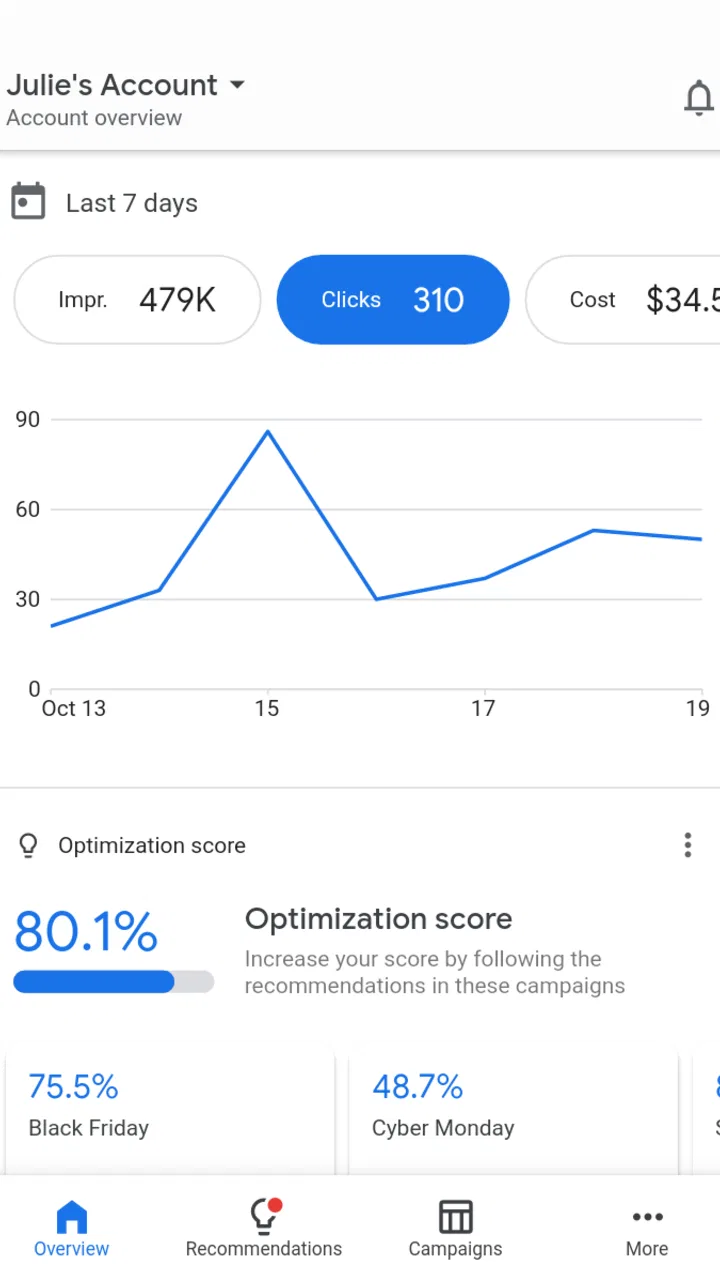
My first impression was that the app makes more sense as a monitoring companion than as a complete replacement for desktop campaign management. A phone screen is well suited to checking whether campaigns are active, reviewing performance movement, and deciding whether something needs attention. It is less comfortable when the task involves detailed comparison, extensive editing, or careful work across many campaigns.
That distinction helps set realistic expectations. I would open the app during a commute, before a client call, or after receiving an alert about campaign activity. I would not choose a small screen for a long planning session involving multiple audiences, detailed keyword decisions, or a broad account restructure. The app’s value comes from speed and access, not from turning a phone into a full office workstation.
For a small business owner, that quick access can be meaningful. Imagine a local service company running ads during a busy week. The owner may not have time to sit at a computer every morning, but can still check the account before opening the shop. A quick review can answer the practical question: does the account look normal, or should I investigate it later at a desktop? That is a better use case than expecting the app to handle every part of a sophisticated advertising workflow.
Free access does not mean free advertising
The application itself is free. That makes the entry decision straightforward: installing it does not require buying the app. However, the app is a tool for managing Google Ads activity, and using the tool should not be confused with receiving free advertising. Campaign spending is a separate matter from the app’s download cost.
I appreciate this separation because it keeps the value discussion honest. The free app can help me supervise work that may involve a real advertising budget, but it does not replace the need to plan that budget carefully. Someone deciding whether to install it should ask, “Do I already manage Google Ads campaigns?” rather than assuming that free access makes the advertising service itself cost-free.
For an existing advertiser, the no-cost app can be worthwhile even if it is used only occasionally. Being able to review an account away from a computer may prevent delayed reactions to an obvious issue. For a person who has no active campaigns and no intention of creating them, the free price does not create much practical value. In that situation, the app is likely to remain unused.
How it fits beside desktop tools
I would place Google Ads beside the desktop version, not above it. Desktop access remains the better choice when I need a wide view of an account, compare several dimensions at once, or work through a complicated change with fewer chances of tapping the wrong control. The mobile app is better for quick checks and timely awareness.
It also differs from general analytics apps. A broad analytics dashboard may combine website traffic, sales activity, and several marketing channels. Google Ads is more focused on the advertising account itself. That focus is useful when I need campaign context, but limiting when I want a complete picture of business performance. A campaign can look healthy while the website, sales process, or customer demand tells a different story.
Compared with spreadsheets, the app is more convenient for immediate account access, while a spreadsheet can be better for custom calculations, long-term records, and combining information from different sources. Compared with a desktop browser, the app is faster to open in a casual moment, but less comfortable for detailed analysis. The right alternative depends on the job rather than on which platform is universally best.
Three practical habits that improve its usefulness
The first habit I recommend is separating a quick check from a decision-making session. On the phone, I would look for signs that deserve attention, then reserve major changes for a larger screen. This reduces the temptation to make a rushed adjustment simply because a single number looks surprising.
The second is to compare movement with context instead of reacting to one isolated result. A campaign may fluctuate for reasons that are not obvious from a brief glance. I would treat the app as an early-warning tool: notice a change, record what caught my attention, and investigate properly before changing settings. That workflow is especially important for anyone overseeing several campaigns or managing a client account.
The third is to use mobile access for communication, not just inspection. If I work with a colleague or client, a quick account check can help me answer whether a concern is visible in the advertising account before promising a solution. The app does not remove the need for a thoughtful explanation, but it can shorten the delay between a question and a useful first response.
Where the mobile format creates friction
The main limitation is the same feature that makes the app convenient: the small screen. Detailed advertising decisions benefit from space, comparison, and concentration. On a phone, it is easier to skim rather than study. That can be fine for routine supervision, but it becomes a weakness when the account needs careful diagnosis.
I would also be cautious about using a mobile interface for high-stakes changes while distracted. A phone is often used in noisy, interrupted situations, and advertising settings deserve deliberate attention. My preferred workflow is to use the app to identify what needs checking, then move to desktop access when the decision could materially affect campaign direction or spending.
Another trade-off is specialization. Google Ads is not designed to become my complete marketing workspace. I still need other tools or processes for landing-page review, customer follow-up, sales reporting, creative organization, and broader business analysis. That is not a flaw in a focused app, but it does mean the app’s usefulness depends heavily on what I expect from it.
Who will get the most value?
The strongest audience is an advertiser who already has Google Ads campaigns and occasionally needs access away from a computer. That includes a small-business owner, an independent consultant, or a marketing professional who wants a convenient mobile companion. The app is especially sensible for people who value awareness and responsiveness more than doing every task from a phone.
It can also help someone who is responsible for more than one account, provided they are comfortable treating mobile access as a review step rather than the entire workflow. A quick check before a meeting can make the conversation more focused. Instead of starting with uncertainty, I can identify whether the concern appears to be campaign-related or whether it needs a wider business investigation.
New advertisers may find the app less useful if they are still learning the fundamentals of campaign structure, targeting, creative decisions, and measurement. A mobile interface can make access easier, but it cannot replace a clear strategy. Beginners who expect the app to explain every advertising decision or automatically solve weak results may be disappointed.
I would skip it if I do not use Google Ads, if my work depends mainly on other advertising platforms, or if I want one dashboard combining every marketing channel. I would also avoid relying on it as my only workspace for complex account management. In those cases, desktop tools or a broader analytics solution are likely to fit better.
What the public response suggests
The developer is Google LLC, which makes the app a natural choice for people already working inside Google’s advertising ecosystem. That does not automatically make it the best option for every workflow, but it reduces the awkwardness of using an unrelated third-party tool for account oversight. The app was released on March 4, 2015, so it is an established product rather than a new experiment.
The Everyone age rating also makes it broadly accessible from a content-classification perspective. In practical terms, the more important question is professional suitability: whether the user has an advertising account and a reason to monitor it. The rating does not change the fact that campaign decisions can have business consequences and deserve care.
My buy-or-skip verdict
There is no purchase decision for the app itself because it is free. The real choice is whether free mobile access adds enough convenience to justify a place on my phone. For an active Google Ads advertiser, my answer is yes. I would install it as a companion for quick checks, account awareness, and moments when desktop access is inconvenient.
I would not present it as a complete substitute for desktop campaign management. Its best role is narrower and more useful: keep me connected to the advertising account, help me notice what deserves attention, and let me respond sooner when timing matters. The discipline is to avoid confusing a quick mobile view with a full performance analysis.
My recommendation is therefore conditional but clear. Choose Google Ads if you already run campaigns and want free, direct mobile oversight. Keep desktop access for detailed work, use wider analytics tools for business context, and do not interpret the free app as free advertising. If you have no Google Ads activity or need a unified marketing dashboard, skip it. For the right user, though, it is a practical business companion rather than an unnecessary duplicate of the browser experience.
In my experience, that focused role is exactly why the app works. It does not need to replace every advertising tool to be useful. It only needs to make the distance between a campaign question and a first informed check shorter, and for active advertisers, that can be valuable.
FAQs for Google Ads
01What is Google Ads and how does it work?
Google Ads is an online advertising platform developed by Google, where advertisers can display brief advertisements, service offerings, product listings, or videos to web users. It works on a pay-per-click (PPC) model, meaning you only pay when someone clicks on your ad. The platform allows businesses to target specific audiences and optimize their ad campaigns for better visibility and results.
02How can I set a budget for my Google Ads campaign?
Setting a budget in Google Ads is flexible and user-friendly. You can choose a daily budget for each campaign, which limits how much you spend per day. You can also set a total campaign budget if you prefer. Google Ads will then optimize the delivery of your ads within the constraints of your budget, ensuring you stay within your financial limits.
03What types of ads can I create with Google Ads?
Google Ads offers a variety of ad formats to suit different marketing goals. These include search ads, which appear on Google search results; display ads, which appear on websites within the Google Display Network; video ads, which run on YouTube; and shopping ads for promoting products. Each type is designed to target specific audiences effectively.
04How do I measure the success of my Google Ads campaigns?
Google Ads provides detailed analytics and reporting tools to measure campaign success. Key metrics include click-through rate (CTR), conversion rate, cost-per-click (CPC), and return on ad spend (ROAS). By analyzing these metrics, you can assess how well your ads are performing and make data-driven decisions to improve your campaigns.
05Can I target specific audiences with Google Ads?
Yes, Google Ads offers extensive targeting options to reach specific audiences. You can target users based on demographics, location, interests, and behaviors. Additionally, you can use remarketing to re-engage users who have previously interacted with your ads. This level of targeting ensures that your ads reach the most relevant audiences, maximizing your campaign's effectiveness.
Pros
- User-friendly interface for beginners.
- Comprehensive targeting options.
- Real-time performance tracking.
- Integration with Google Analytics.
- Budget control and flexibility.
Cons
- Can be costly for small businesses.
- Steep learning curve for advanced features.
- Limited customer support options.
- Requires ongoing management.
- Complex reporting tools.

Google Ads
Gallery